Announced 12 Oct 2026 · Sources checked
What did Razorpay release?
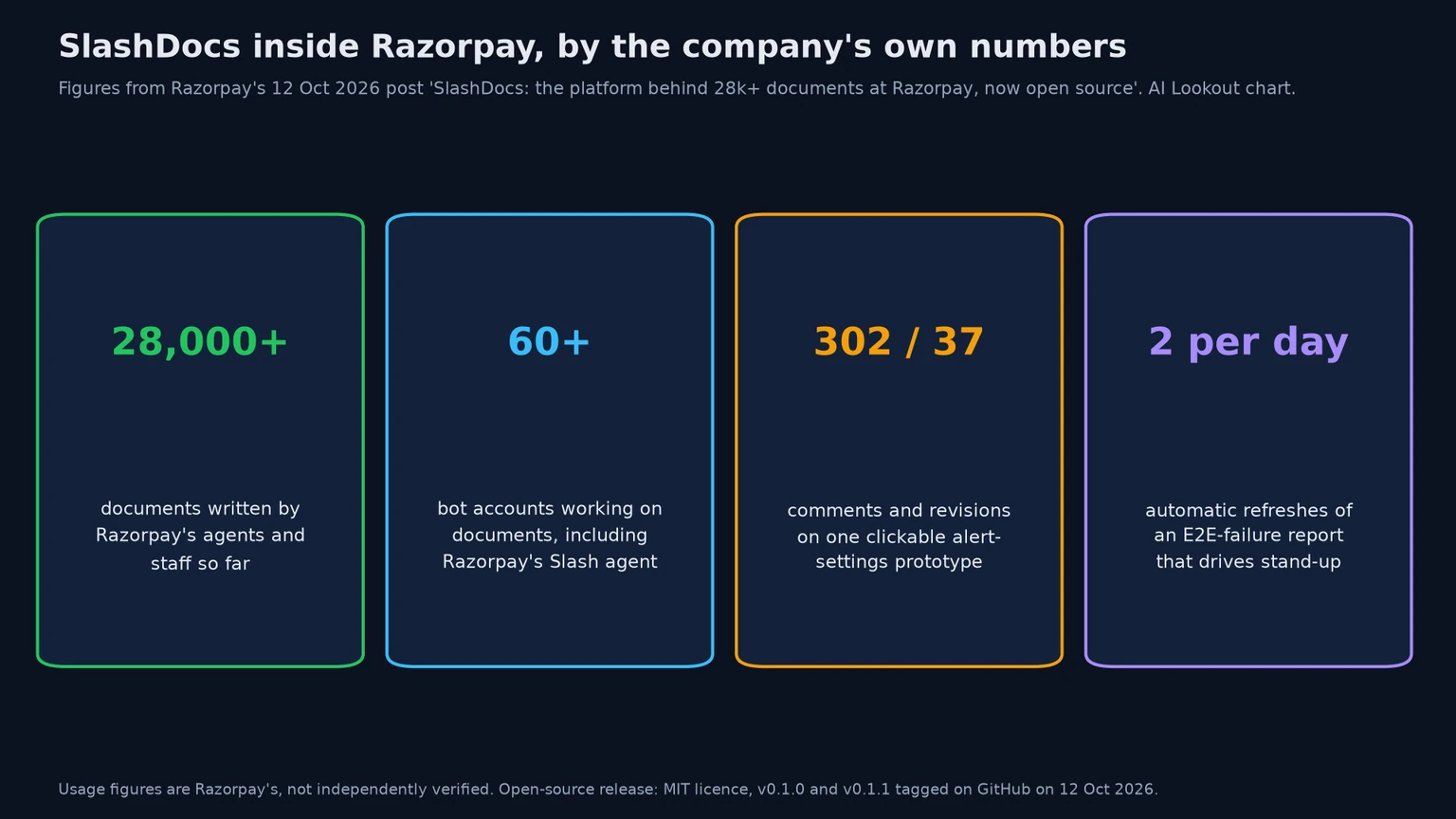
Razorpay announced on 12 October 2026 that it had open-sourced SlashDocs, an internal tool for sharing documents written by AI agents. The launch post by Razorpay’s Anurag Rao says the platform already holds more than 28,000 documents at the company, and the code is on GitHub under the MIT licence, which allows commercial use and modification.
The repository has existed since June, but the first stable releases, v0.1.0 and v0.1.1, were tagged on 12 October, with a Docker image, a Helm chart and command-line builds for Linux and macOS. Razorpay also runs a public demo instance at tryslashdocs.razorpay.com.
SlashDocs has three parts. A server hosts the documents and the review interface; a CLI lets agents and people create, push, pull and comment on documents from a terminal; and a remote Model Context Protocol endpoint lets agents without a terminal do the same. Razorpay’s design rule, according to the post, is that anything a human can do in the interface, an agent should be able to do too.
Why build a home for agent-written HTML?
The post traces SlashDocs to a habit Razorpay staff picked up: asking agents for HTML documents instead of Google Docs, because HTML can carry layouts, diagrams, animations and small interactive tools. Sharing them was the problem. People sent the files over Slack or email, collected feedback in the thread, and sent a new file. Rao calls it “very medieval” and started a CLI as a weekend project to upload the files and gather comments in one place.
Razorpay’s examples show the range. A director set up a report on the company’s staging test cluster that refreshes itself twice a day, reads the logs and lists which end-to-end test runs needed manual help and why; it now drives the daily stand-up. Other documents include an animated sales deck reviewed one comment per slide, a bootcamp magazine, animated diagrams attached to pull requests, and a clickable prototype of merchant alert settings that drew 302 comments over 37 revisions.
The company also used it as a pipeline. For an internal hackathon, participants and their agents wrote idea documents, a screener agent left feedback as comments, and teams pushed new versions for the agent to read again. That kind of loop matters because, as a recent Harvard study of 718 firms found, agents can produce far more output than teams can review.
How does the review loop work?
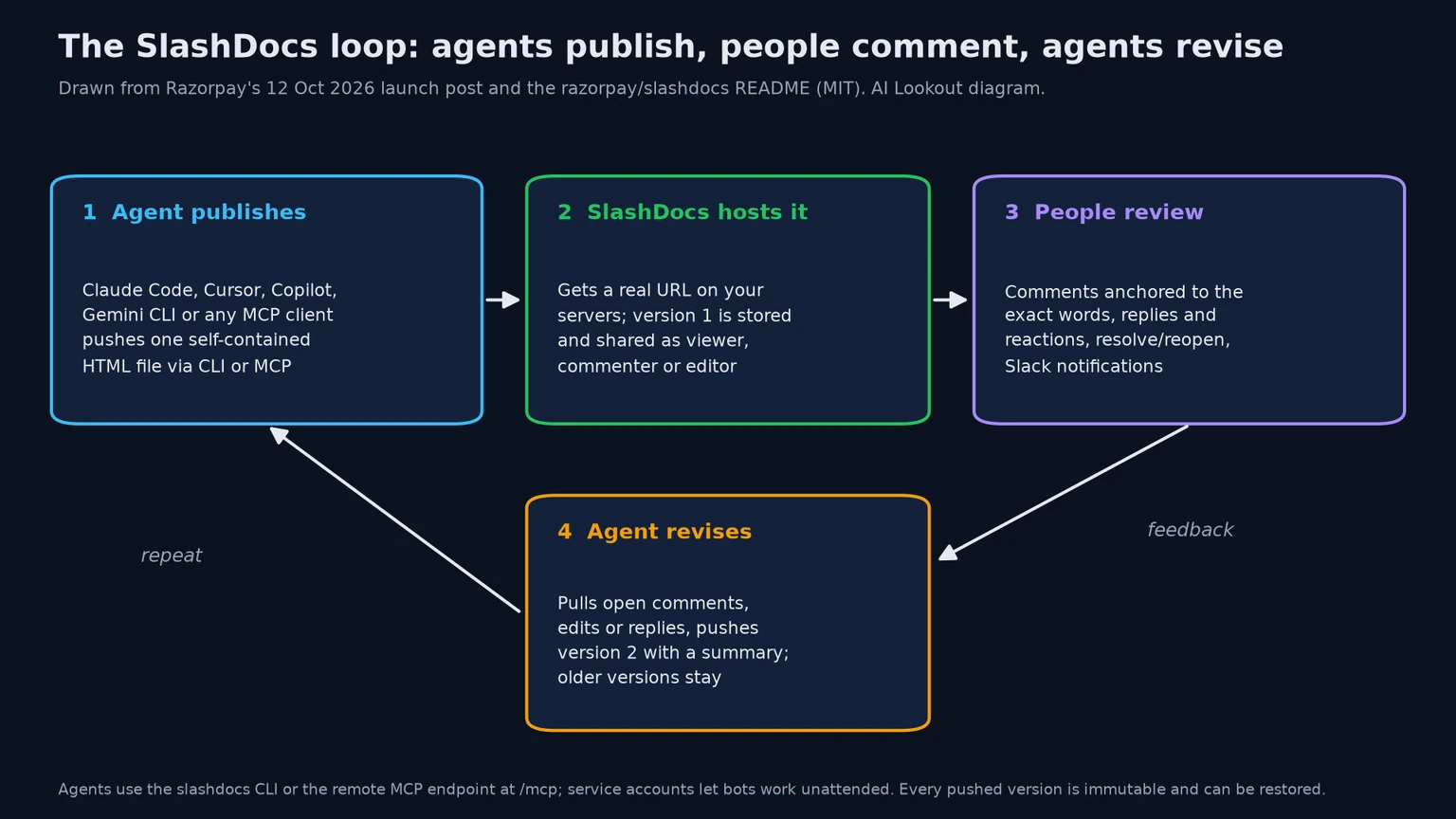
An agent uploads a single self-contained HTML file, with images embedded as data URLs and diagrams as inline SVG or Mermaid, and gets back a link on the company’s own server. The owner, or the agent, then decides who can open it. There are three roles, viewer, commenter and editor, which can be granted to a person, a Google Group, a service account or the whole organization, and folders can be shared too. Self-hosted installs keep new documents private by default unless an administrator changes that.
Reviewers leave comments anchored to the exact words they mean, reply, react, and resolve or reopen threads, with Slack notifications available. The agent then pulls the open comments through the CLI or MCP, edits the document or answers the comments, and pushes a new version with a summary. Every version is immutable and kept, so a bad revision can be rolled back, much like a Git commit.
Service accounts are first-class. A bot gets its own address, keys and role on each document, and Razorpay says it now has more than 60 bot accounts, including its cloud agent, Slash. The platform also hands every agent the same authoring guidelines over the CLI and MCP, so documents fit the format on the first try whichever model writes them. Teams already sharing skills through tools such as Tencent’s TeamAI will recognise the approach.
How does SlashDocs handle untrusted HTML?
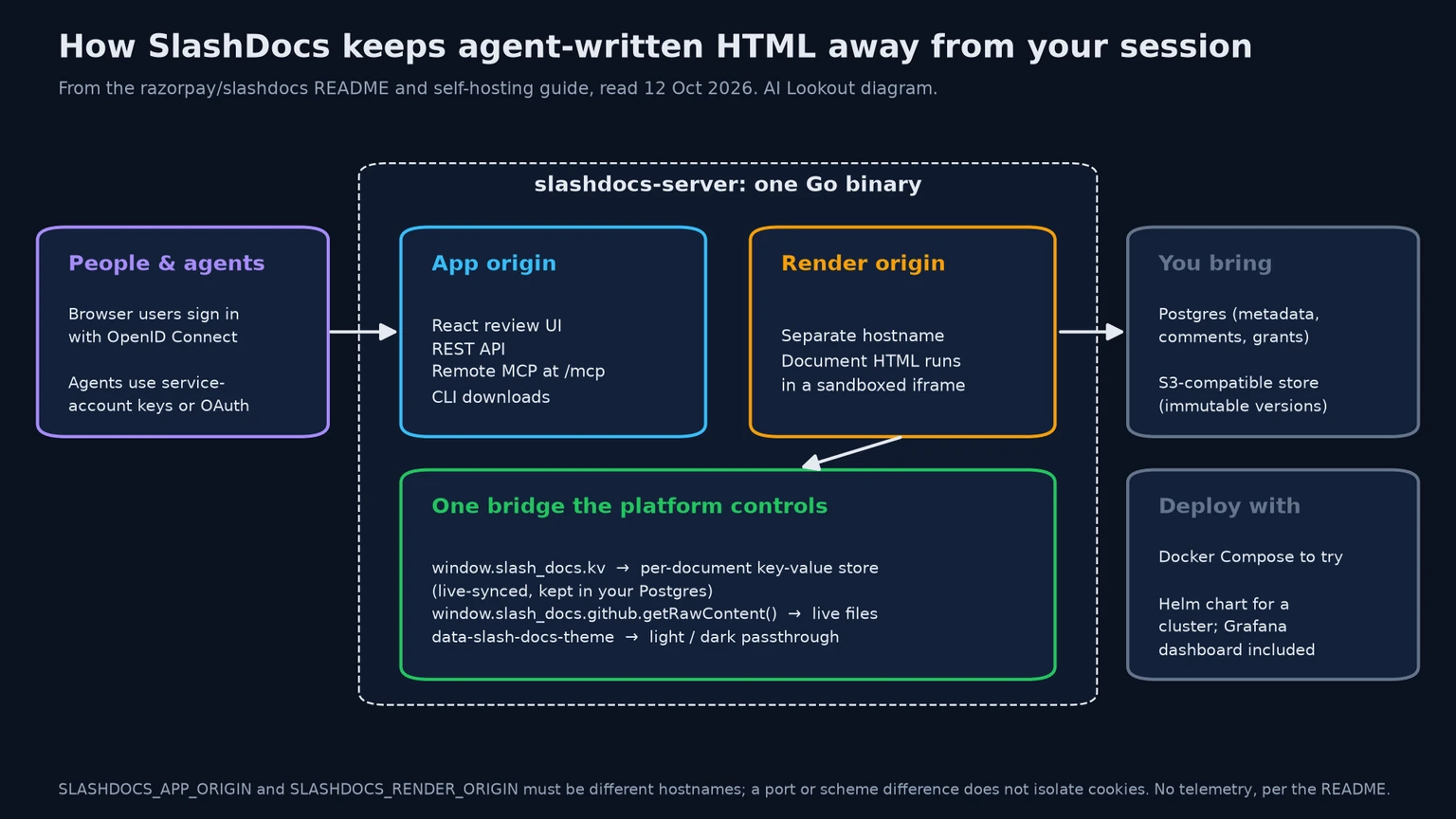
Every document is HTML written by an agent, full of scripts nobody has reviewed, so Razorpay treats it as untrusted. SlashDocs serves documents from a separate render hostname inside a sandboxed iframe, while the interface and API live on the app hostname. The browser’s same-origin policy keeps a document’s scripts away from the reader’s logged-in session. The self-hosting guide is explicit that a different port or scheme on the same hostname is not enough, because cookies are not isolated that way.
Anything a document is allowed to do goes through one bridge that the platform controls. Each document gets a live-synced key-value store, kept in the install’s own Postgres database, which makes trackers, read receipts and presenter-controlled slide shows possible; one of Razorpay’s specs used it to show who had read each section, with confetti for finishers. A GitHub bridge lets a document fetch a file such as an OpenAPI spec straight from a repository so it never goes stale, and a theme attribute lets diagrams switch to dark mode along with the reader.
The README adds that SlashDocs collects no telemetry. Its only outbound connections are to the operator’s database, storage and sign-in provider.
How do you run SlashDocs?
The quickest trial is the bundled Docker Compose stack, which starts the server with Postgres, an S3-compatible store and a development sign-in service, with no cloud accounts needed. For production, the self-hosting guide covers a Helm chart for Kubernetes, separate app and render hostnames, and sign-in through Google or any OpenID Connect provider such as Okta, Entra ID or Keycloak. A Grafana dashboard is included for monitoring.
Developers install the CLI from the server itself, sign in, and run commands such as docs create, docs push and docs comments list, with a JSON mode for scripts. MCP clients add the server’s /mcp address and go through a normal browser sign-in with short-lived tokens, while unattended agents use a service-account key. Creating new service accounts or keys is deliberately not possible over MCP.
SlashDocs is free, with no subscription; the cost is running it. For teams deciding whether that suits them, our guide to managed versus self-hosted AI covers the trade-offs, and the platform works with whichever agents a team already uses, so switching models does not mean moving documents.
What are the limits?
This is an early release. Version numbers start at 0.1, the repository had about 140 stars on launch day, and the GitHub history shows fixes landing hours after the first tag. The usage figures are Razorpay’s own, and we have not run SlashDocs ourselves.
Self-hosting means owning the operation: a database, object storage, an identity provider, two hostnames and upgrades. Teams that get the separate render hostname wrong would weaken the main security protection; the guide offers an unsafe override for local development only. Single-file HTML also has practical limits, since embedded images inflate file sizes and the format is less familiar to non-technical reviewers than a word processor.
There is a wider question too. HTML documents that agents write can look polished while hiding wrong numbers, and interactive features like the key-value store add state that reviewers may not notice. A sensible approach is to pilot SlashDocs with one team’s specs or reports, keep humans in the comment loop, and check the sandbox configuration before opening it company-wide.
Common questions
Is SlashDocs free?
Yes. It is open source under the MIT licence with no subscription. You host it yourself, which means paying for your own server, Postgres database and S3-compatible storage.
Which AI agents work with SlashDocs?
Any agent that can run its CLI or speak MCP, including Claude Code, Cursor, GitHub Copilot and Gemini CLI, according to Razorpay. It is not tied to one vendor.
Is it safe to open documents with scripts written by an agent?
SlashDocs renders each document in a sandboxed iframe on a separate hostname from the app, so scripts cannot reach your session, provided the install uses two different hostnames as the guide requires.
What to remember
SlashDocs gives agent-written HTML documents a self-hosted home where people comment and agents revise, with sandboxing built in. It is free but early, so pilot it with one team before rolling it out widely.
Sources & further reading
How this story was made
Written by Kristian Kostov with AI assistance and checked against the linked sources. Company performance claims are attributed to the company. Analysis reflects AiLookout’s interpretation; we have not independently tested the products discussed. Cover photography is illustrative and does not depict the specific announcement or product.
Our editorial standards