Announced 15 Oct 2026 · Sources checked
What OpenBMB released
OpenBMB, the open-source group behind the MiniCPM models, has released PilotDeck 2.0, the second major version of its open-source desktop workspace for AI agents. The project's README dates the release to 15 October 2026 and lists the headline changes: one-click installation with visual setup, long-running tasks that keep going across as many as 2,000 interaction messages, and new skills for producing Word, Excel and PowerPoint files.
PilotDeck is developed jointly by Tsinghua University's THUNLP lab, ModelBest, OpenBMB and AI9Stars, the same circle that builds the MiniCPM family of on-device models. It was first open-sourced on 28 May 2026 under the GNU Affero General Public License v3.0. The repository had about 4,700 stars and 510 forks when AI Lookout checked on 18 October, and the team has been shipping dated builds every few days; the latest, v2026.10.17, was published late on 16 October UTC.
The OpenBMB documentation is explicit that PilotDeck is “an agent product that you install and configure with a model service; it is not a base model with downloadable weights.” You bring your own model API keys, and what it can do, and what it costs, depends on the models, tools and permissions you give it.
How a WorkSpace works
PilotDeck's central idea is the WorkSpace, a project-level container the team also calls a deck. Each WorkSpace gets its own file system boundary, its own memory store and its own skill set. The documentation describes the file layer as a clearly defined range of folders the agent may read and change, with AI-generated files marked so you can tell them apart from your own.
The point is to run several long projects side by side without one leaking into another. In most chat-style agents a single shared context accumulates everything, so preferences and facts from one job can colour the next. PilotDeck instead scopes retrieval to the current WorkSpace, so the agent only searches that project's memory and files. Skills can be installed into one WorkSpace from a skill store or shared across all of them.
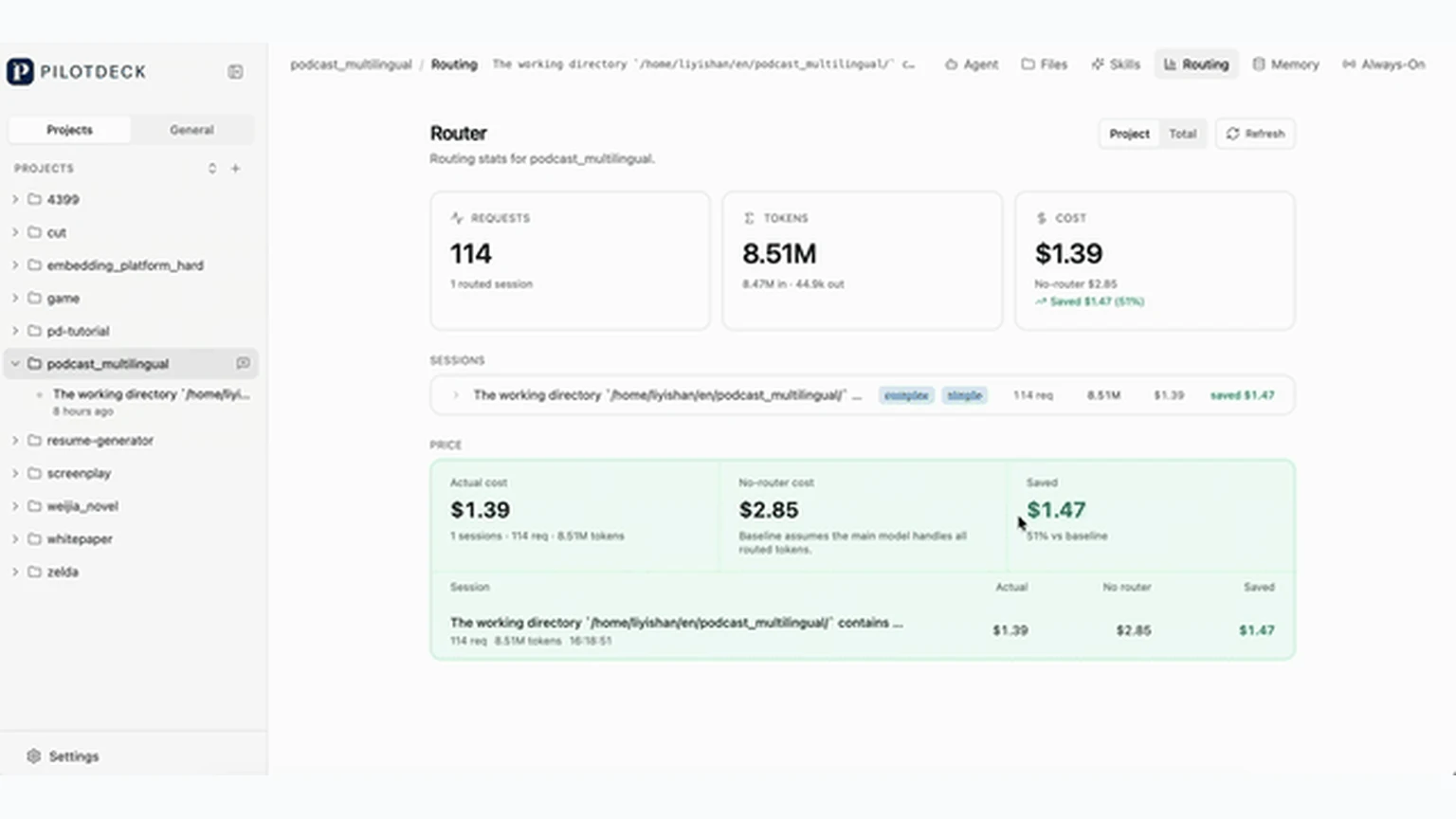
Each WorkSpace also tracks its own token spend, which the team presents as a way to see what a background task actually costs. A 13 October build added daily token usage statistics.
White-box memory and Dream mode
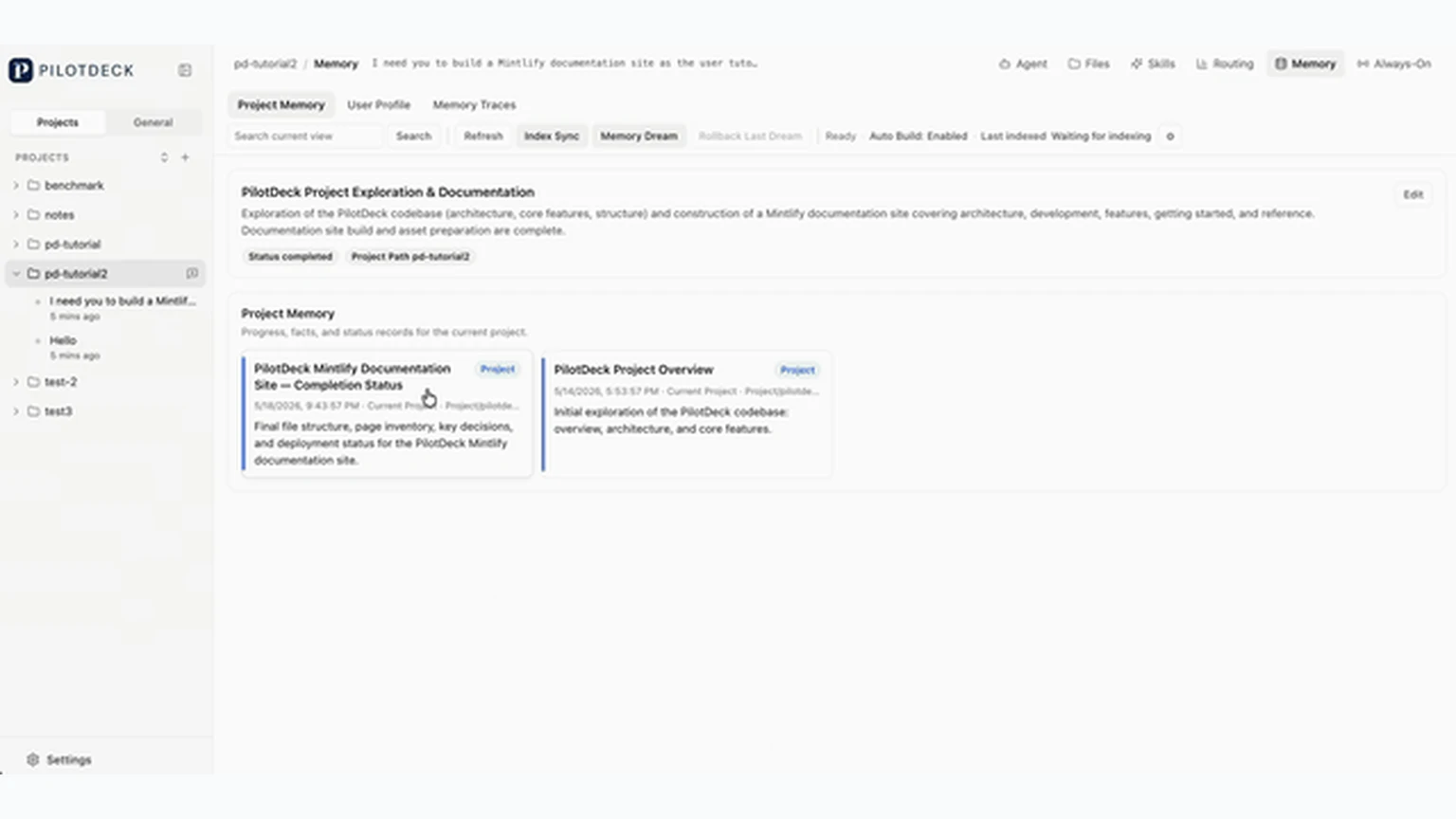
Memory is where PilotDeck most clearly differs from closed agent apps. The documentation describes two layers: Project Memory for a project's goals, progress and constraints, and Feedback Memory for the user's own preferences and requirements. Every entry is labelled with a timestamp, a source path and a type, and the whole pipeline of generation, extraction, storage and retrieval is visible in the interface.
The team calls this white-box memory. If the agent remembers something wrong, you can find the entry that caused it and edit or delete it rather than starting a new chat. Important decisions can be pinned so they do not drift. A built-in Dream mode uses idle time to summarise and reorganise memory in the background, and the README says that consolidation can be rolled back with one click if it goes wrong.
That approach sits at the opposite end from systems that hand memory to a model. Tencent's HY-Memory, released the same week, trains a small model to write an agent's memory for it. PilotDeck keeps memory as plain, inspectable records and leaves the final say to the user.
Smart routing and the cost claims
The second pillar is what PilotDeck calls Smart Routing. The system estimates how hard a task is and sends complex work to a strong model while dropping simple calls to a cheaper one. The documentation says routing happens at the sub-agent level rather than per request, so the conversation with any one model is not broken up and its key-value cache keeps working. Users can also write their own routing rules, and a TokenSaver feature adds automatic downgrading and fallback across providers.
The README publishes two sets of numbers, both from the team's own tests. On a Xiaohongshu-style social media workload, routing that used Claude Opus 4.5 for planning and Sonnet 4.5 for sub-tasks cost $2.83, against $12.58 with routing turned off, a saving the team puts at more than 70 percent. On a set of seven complex tasks, including a multilingual podcast push, multi-source data reports, a literature review and codebase documentation, Claude Sonnet 4.6 as the main model with MiniMax-M2.7 as the sub-agent scored 70.6 for $3.15. Sonnet 4.6 alone scored 69.1 for $18.36, and MiniMax-M2.7 alone 37.1 for $1.90.
The documentation adds that the figures are “for reference only” and that real costs depend on the models and tasks you configure. The scoring method for the seven tasks is not described in the README, and the results have not been independently reproduced. The team also claims PilotDeck performs on par with Claude Code and WorkBuddy on the WorkBuddy Bench office test set, without publishing the scores.
Always-on tasks, chat apps and computer use
The third pillar, Always-on, is meant to keep work moving when you are away. PilotDeck can run scheduled tasks on cron-style timers, keep long monitoring jobs going, and, in the team's words, proactively discover tasks worth doing, then leave results as local files with a summary report. The 2.0 release's claim of stable runs across 2,000 messages is aimed at exactly these long jobs.
A message gateway that speaks WebSocket and HTTP lets you drive the same agent from the web interface, the command line, the desktop app or a chat app. The documentation names Feishu and WeChat, and the v2026.10.16 release added working Slack and Telegram channels and streaming replies in chat apps. Earlier, the v2026.10.13 build added built-in computer use through a managed Cua Driver MCP server, so the agent can operate a desktop as well as call tools.
Giving an agent a shell and a desktop raises the stakes on permissions. The v2026.10.17 release tightened that layer: it parses shell commands with tree-sitter before classifying them, closes parser gaps in permission checks, and bounds desktop downloads. That is the same class of risk that tools such as OpenRouter's Armor classifier try to catch from the model provider's side.
How to install it and what it needs
According to the deployment guide, PilotDeck runs on Windows 10 or later, macOS 14 or later and Ubuntu 22.04 or later, with desktop installers for Windows and macOS and DEB and RPM packages for Linux on x64 and ARM64. There is also a one-line install script for macOS, Linux and Windows PowerShell, and a source build that needs Node.js 22.13 or later but below 23, Git, Python 3, build tools and ripgrep.
You need at least one model reachable through an API. Supported protocols include OpenAI, OpenAI Responses, Anthropic and Google, and the guide lists compatibility with providers such as DeepSeek, Qwen, Kimi, MiniMax and OpenRouter. The web interface runs on port 3001 and the gateway on port 18789, both on your own machine.
A Docker setup runs the gateway and the web server as two processes and persists all state, including memory, skills, sessions and router statistics. Its defaults point at OpenRouter, with DeepSeek V4 Flash as the main model and Qwen3-8B as the light routing and judging model, though any provider can be configured. The project's website offers the desktop downloads and an online demo.
Where it fits among agent tools
The README positions PilotDeck against Claude Code, Cursor and Trae Solo for programming, Claude Cowork for project-isolated desktop work and WorkBuddy for chat-app agents, and says its focus is long-running work across many projects. In the open-source world it overlaps most with self-hosted agent shells such as Nous Research's Hermes Agent, which also connects to many model providers and local models. PilotDeck's distinguishing bets are the per-project WorkSpace, editable memory and routing between models of different price.
For developers and small teams in China, its native Feishu and WeChat access and its defaults around Chinese model providers are practical advantages. For everyone else, the appeal is an AGPL-licensed workspace that can be inspected, self-hosted and pointed at whichever models a team already pays for.
Limitations and open questions
All the performance and cost figures come from the PilotDeck team, on task sets it chose, and AI Lookout has not run them. Parts of the README also lag the release: its description of Smart Routing still gives Claude 3.5 Sonnet and GPT-4o as example models, while the measured results use newer ones.
The AGPL-3.0 licence matters for anyone who wants to build on PilotDeck. It allows commercial use, but if you modify the software and let other people use it over a network, you must offer them your modified source code. Companies that want to embed it in a hosted product should read the licence carefully.
Finally, an always-on agent with file access, a shell, computer use and chat-app control is powerful and risky. The repository had about 158 open issues and pull requests on 18 October, and the frequent permission fixes show the security model is still being hardened. Running it with narrow permissions, separate API keys and spending limits is the sensible default until it has a longer track record.
Common questions
What is PilotDeck?
An open-source agent workspace from Tsinghua's THUNLP lab, ModelBest, OpenBMB and AI9Stars. You install it on your computer, connect your own model APIs, and run agents inside per-project WorkSpaces.
What is new in PilotDeck 2.0?
One-click installation with visual configuration, more stable long-running tasks across up to 2,000 interaction messages, and new skills that produce Word, Excel and PowerPoint files.
Is PilotDeck free to use?
The software is free under the AGPL-3.0 licence, but you pay for whichever model APIs you connect. If you modify it and offer it to others over a network, the licence requires sharing your source.
Sources & further reading
How this story was made
Written by Kristian Kostov with AI assistance and checked against the linked sources. Company performance claims are attributed to the company. Analysis reflects AiLookout’s interpretation; we have not independently tested the products discussed. The cover places the companies’ own logos, taken from public-domain or openly licensed files credited in the caption, on a plain background. It is not a product photograph, a screenshot, or an endorsement.
Our editorial standards