Announced 9 Oct 2026 · Sources checked
What is Code Video Model?
Code Video Model is a training-free method for controllable video generation, published by a team whose tech report carries Microsoft Research branding. The GitHub repository added the report and a demo video on 9 October 2026, alongside a project page and the CodeVideoBench dataset.
The idea borrows from film production. Before shooting, studios often make previs, a rough animated version of the scene that fixes where things go and how the camera moves. Code Video Model makes that previs out of code and then lets a video model paint over it.
The authors argue that video diffusion models have two weaknesses. They learn how the world looks from pixels, not how it works from equations, so a thrown ball may float or a pendulum may lose its rhythm. And control is indirect: you can ask for a smaller object or a different camera path, but exact timing and size stay hidden until you see the result. A graphics engine has the opposite strengths and weaknesses, so the paper combines the two.
How does a program become a video?
Given a prompt, a coding agent writes a Three.js program, the popular JavaScript 3D library, that places objects, animates them, sets a camera path and computes dynamics from equations where a physical model exists. In the paper’s setup the agent is GPT-6, and it refines the program by reviewing rendered previews.
Rendering that program produces a proxy video, a coarse version of the shot with simple geometry and flat materials. It takes less than a minute, so a user or agent can inspect and edit the structure before running the expensive video model.
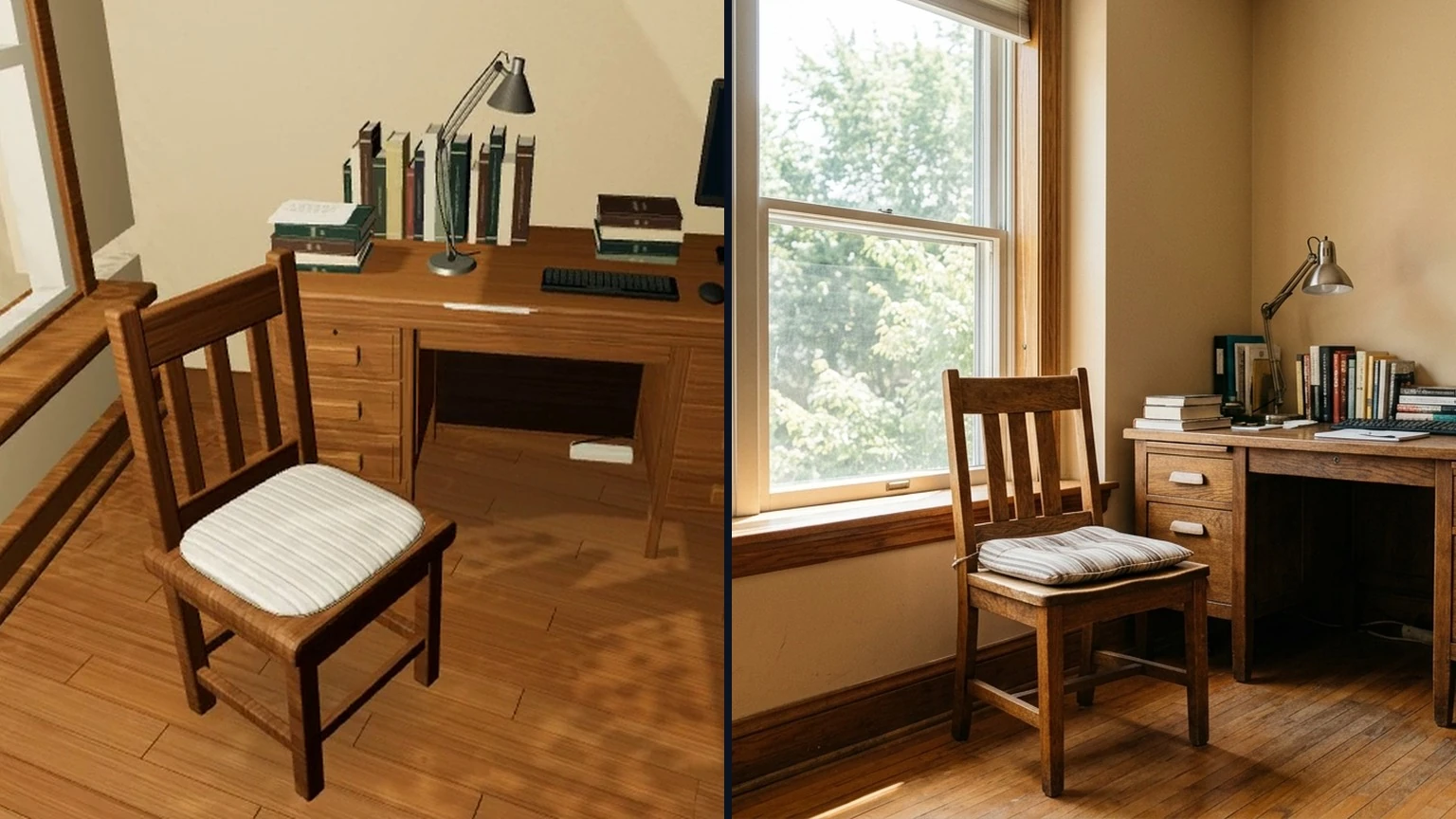
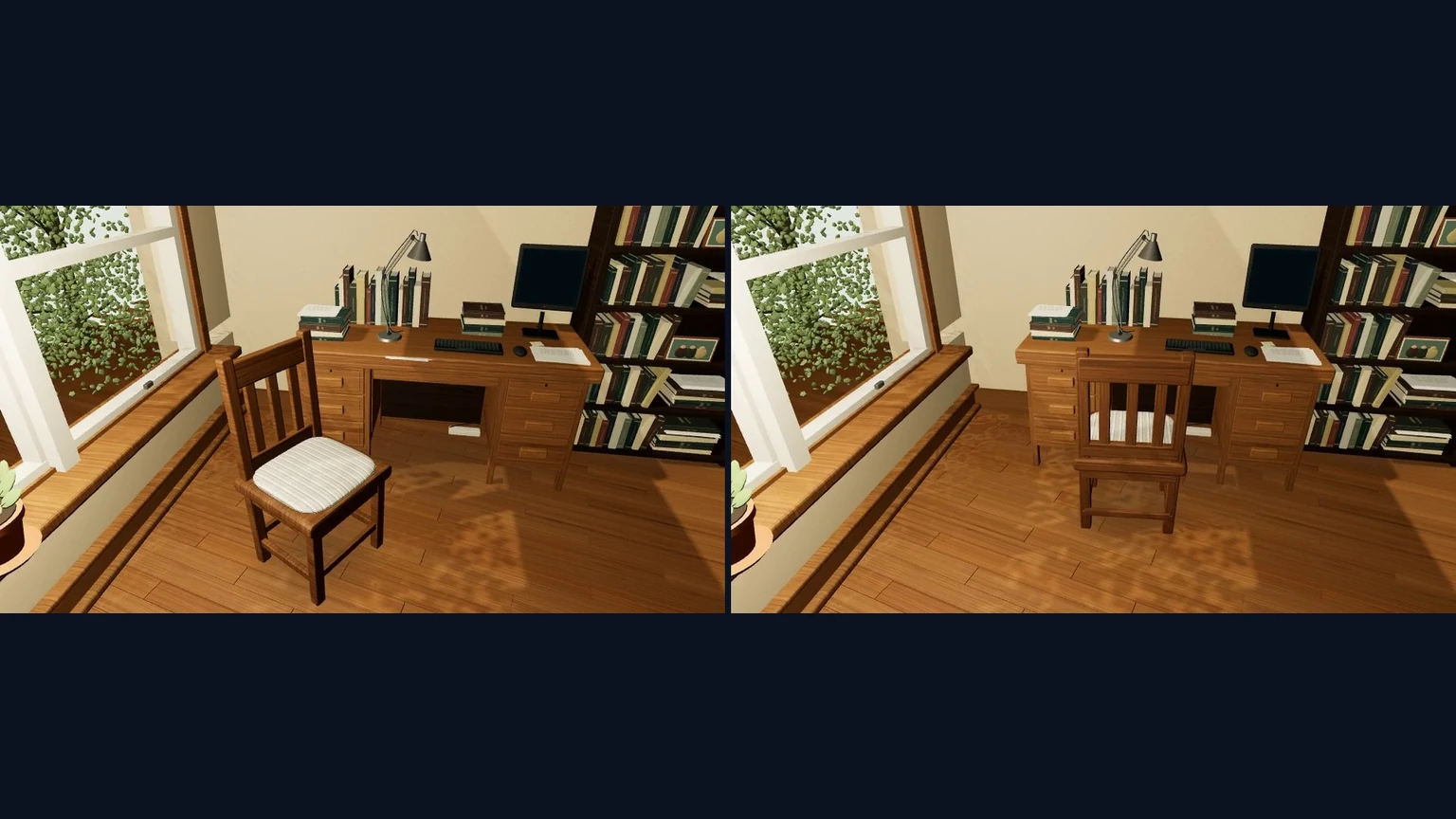
Edits are ordinary code changes. In one example, changing a list of waypoints reroutes a quadruped robot while the rest of the scene stays the same. Other examples swap an arch for a doorway, a humanoid for a quadruped, or move a chair from the window to the desk.
Unless the user supplies one, the agent also renders a representative frame and asks an image model, GPT-Image-2 in the paper, to turn it into a realistic reference image. That reference supplies the appearance for the final clip.
What is early-step conditioning?
The final step uses MiniMax-H3, a reference-to-video model, with all its weights frozen. The obvious approach is to feed it the proxy video and reference image throughout generation. The authors found this backfires: the model copies the proxy’s flat, game-like look, and the prompt cannot override it.
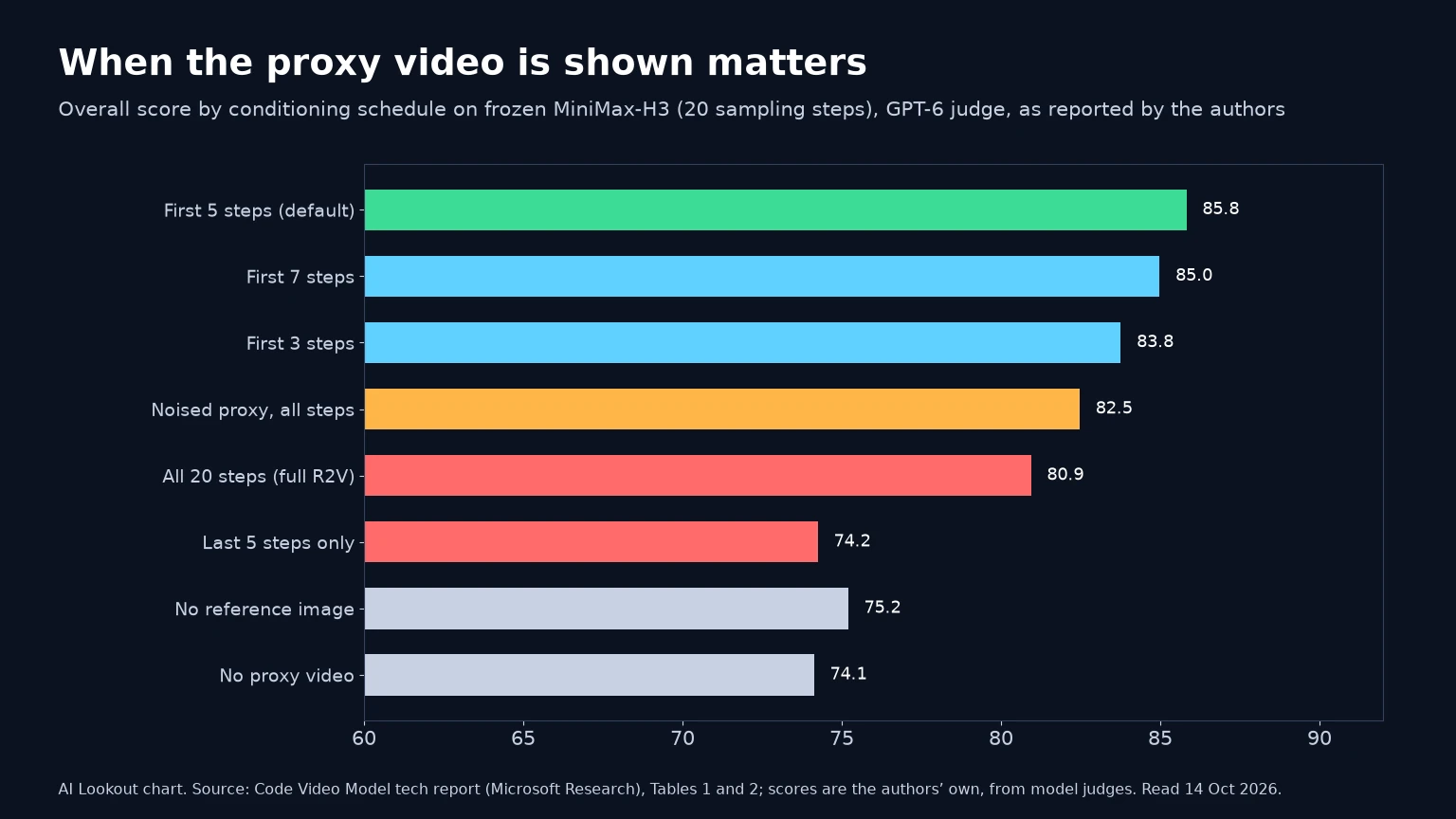
Their fix is early-step conditioning. The proxy video is used only during the first sampling steps, by default the first 5 of 20, or 25%, and its conditioning tokens are then removed. The prompt and reference image stay active throughout.
The reasoning is that diffusion models settle the overall structure early and refine textures and detail later. Showing the proxy early locks in layout, motion, timing and camera; dropping it lets later steps match the reference image. The method needs no fine-tuning and no extra control modules; it changes only when the proxy is visible.
The authors also apply the pipeline to ByteDance’s closed Seedance 2.5 through its public API, and show qualitative examples suggesting the idea is not tied to one model. Those results are not scored in the main tables.
How well does it score on CodeVideoBench?
The team built CodeVideoBench to test the method: 22 cases across eight categories, including gaming, product shots, architectural fly-throughs, physics, bullet time, scene editing, robotics simulation and trajectory variation. Each output is scored from 0 to 100 on structure, meaning agreement with the proxy, style, meaning fidelity to the reference image, and visual quality.
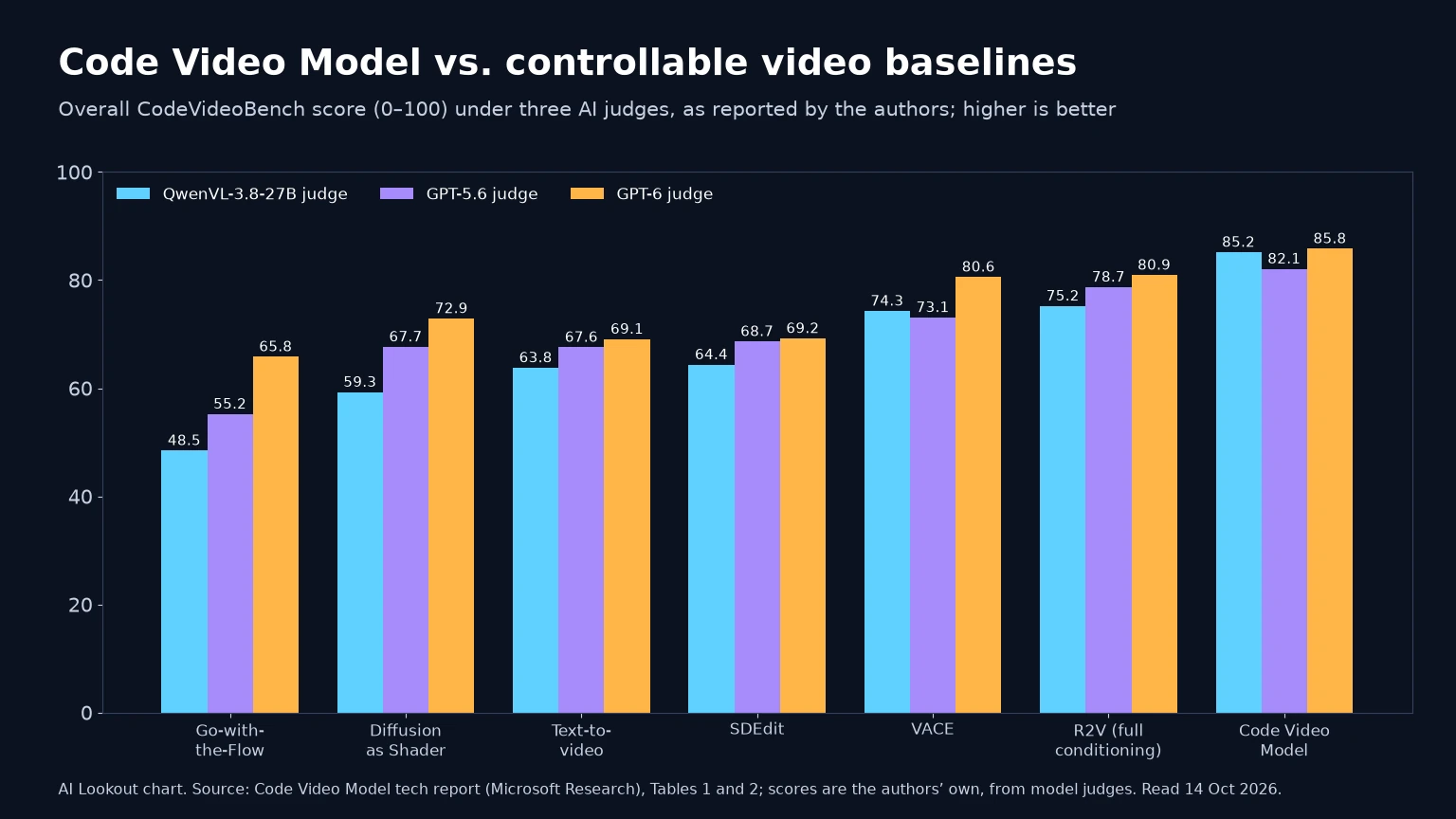
Scoring is done by AI judges, QwenVL-3.8-27B, GPT-5.6 and GPT-6, using the rubric prompts printed in the report. Code Video Model reaches overall scores of 85.2, 82.1 and 85.8 under the three judges, against 74.3, 73.1 and 80.6 for VACE, the strongest learned baseline. Feeding the proxy for all steps scores 75.2, 78.7 and 80.9.
Text-to-video from the prompt alone follows the camera and timing poorly, the authors say, while full conditioning and SDEdit follow structure but keep the synthetic look. In the ablation, the default five-step schedule beats three or seven steps, conditioning only in the last steps, and a noised proxy for the whole run.
These are the authors’ own numbers on their own benchmark, judged by models rather than people, so treat them as a promising signal rather than an independent result. For comparison, other recent video and world-model releases such as Kandinsky 6.0 Video report results on different benchmarks.
How can developers try Code Video Model?
The repository code is released under Apache 2.0. Bundled example prompts, reference images and proxy videos come from CodeVideoBench under CC BY 4.0, and some scene code is MIT-licensed. The repo had about 410 GitHub stars when AI Lookout checked.
The README targets Ubuntu 22.04 with a CUDA 12.6-compatible NVIDIA driver, and asks users to download the MiniMax-H3 checkpoint from Hugging Face. Ready-made examples, such as a sports car, a loft tour and robot navigation, can go straight to the video model.
Writing new scenes is where cost appears. The Three.js stage uses GPT-6, and GPT-Image-2 is reached through OpenRouter with the user’s own key, so users pay for those API calls. The paper’s main runs generate five-second clips at 960×544 with 20 sampling steps.
Developers can also open a browser viewer to scrub the timeline, read each scene file and inspect the camera path, which makes the program the place where a shot is debugged.
What are the limitations?
The authors say exact frame-by-frame and pixel-level alignment remains hard. When the reference image and proxy describe subjects with very different shapes, the model keeps the main composition and motion but may not reproduce every boundary, pose or spatial relation.
That matters for strict compositing, paired training data and geometry-sensitive editing. Physics is only as good as the program: the proxy is grounded where someone or the agent writes a correct equation, and the video model still invents the fine detail on top.
There are also practical limits. The benchmark has 22 cases, the judges are AI models, and AI Lookout has not run the code. The reference images in the examples are themselves AI-generated, so the realism comes from models on both ends of the pipeline.
Why code-driven video matters
Most controllable video work trains extra adapters for depth maps, optical flow or tracking. Code Video Model instead treats an off-the-shelf model as a renderer and moves control into an editable program, which suits coding agents that already write Three.js well.
That could help game previs, product videos and synthetic training data for robots, where exact trajectories matter. It also complements world-model research that generates the scene directly, such as MBZUAI’s WorldGuide and Odyssey-3.
The broader lesson is a division of labour: let code handle what must be exact, such as positions, timing and physics, and let the generative model handle how it looks. If that holds up outside the authors’ benchmark, editing an AI video shot could become as precise as editing a line of code.
Common questions
Is Code Video Model a new video model?
No. It is a training-free pipeline. A coding agent writes a Three.js scene, the render becomes a proxy video, and a frozen MiniMax-H3 model generates the final clip using early-step conditioning. The authors also show examples with Seedance 2.5.
Is Code Video Model open source?
The code is on GitHub under Apache 2.0, and the bundled CodeVideoBench examples are CC BY 4.0. Generating new scenes uses GPT-6 and GPT-Image-2 through paid APIs, and the MiniMax-H3 weights are downloaded separately.
How does Code Video Model score against other methods?
On the authors’ 22-case CodeVideoBench, it scores 85.2, 82.1 and 85.8 under three AI judges, against 74.3, 73.1 and 80.6 for VACE. These are the authors’ results, not an independent evaluation.
What to remember
Code Video Model writes a shot as Three.js code, previews it in under a minute, and lets a frozen video model add realism by showing it the proxy only early in sampling. It is a smart, cheap way to get precise control, though its benchmark is small and judged by AI models.
Sources & further reading
How this story was made
Written by Kristian Kostov with AI assistance and checked against the linked sources. Company performance claims are attributed to the company. Analysis reflects AiLookout’s interpretation; we have not independently tested the products discussed. Cover photography is illustrative and does not depict the specific announcement or product.
Our editorial standards