Announced 13 Oct 2026 · Sources checked
What did Datalab release?
Datalab, the company behind the open-source Marker and Surya document tools, published Indra OCR on 13 October 2026. The announcement, written by Vik Paruchuri, describes an OCR package built around a recognition model of about 1 million parameters that reads 49 pages per second on 32 CPU cores.
The GitHub repository was created the same day and holds the Apache 2.0 code, a command-line tool, a Python API and a local viewer. The models are published on Hugging Face as about 18 MB of ONNX files that run on ONNX Runtime, OpenCV and pypdfium2, with no PyTorch dependency. Datalab says the package is tested on Linux (x86_64 and aarch64) and on Apple-silicon Macs with Python 3.10 to 3.13.
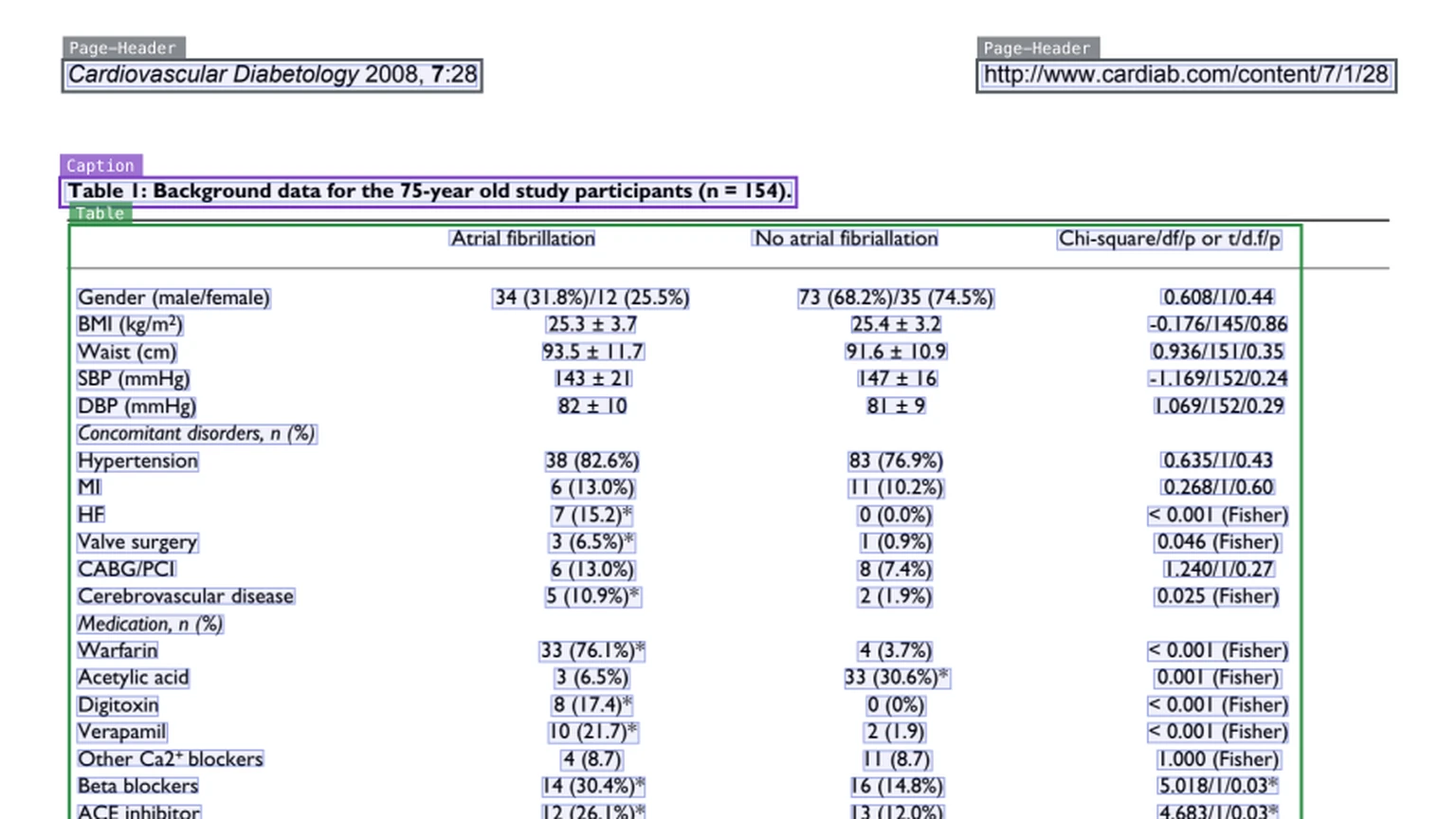
Indra is more than a text reader. For every page it returns a bounding box for each line and each layout block, a label for each block, such as section header, list, table, caption, footnote, form, table of contents, page header or page footer, and the order in which the blocks should be read. Output comes as markdown, plain text or JSON. In markdown, headings become “#” lines, tables are written as HTML, and page headers and footers are dropped unless you ask to keep them.
How does Indra OCR work?
The repository describes the pipeline as line detection, CTC recognition, reading order and markdown. The Hugging Face listing shows separate small ONNX models for detection, recognition, a Chinese-Japanese-Korean recognizer, reading order, page orientation and script detection, plus optional math models. Pages that are upside down or sideways are turned upright before reading.
For digital PDFs, Indra first checks the PDF’s own text layer. When that layer passes its checks, it uses the embedded text rather than running OCR, and it only recognises what is missing, such as text inside images. Datalab says this is why digital pages are faster: in its throughput run, pages with a usable text layer took a median of 130 ms, against 304 ms for pages that needed OCR.
Math is off by default. With the --math flag, a small classifier finds lines that contain math and a second recognizer writes them as text with inline LaTeX. Datalab says this lifts its benchmark text score from 41.4 to 57.5 but slows math pages, which is why it is opt-in, and the math models download only when the flag is used.
Script support depends on the source. On scans and images, Indra reads Latin script in about 50 languages, Cyrillic, Greek, Devanagari, Bengali and simplified and traditional Chinese. Through a digital PDF’s text layer it can handle any script; Datalab says it checked pages from 75 language families, including Arabic, Hebrew, Thai, Japanese and Korean.
How fast and accurate is it, according to Datalab?
Datalab scored Indra on OmniParseBench, a benchmark it describes as new and its own: 16,288 pass-or-fail tests on 2,937 pages. Every engine ran on 4 x86 vCPUs, one page at a time, with default settings. The headline score combines text, table and layout tests; engines that only output lines get no headline score.
| Engine | Headline | Text | Tables | Layout | Median ms per page |
|---|---|---|---|---|---|
| Indra OCR (default: text layer + OCR) | 62.1 | 41.3 | 56.4 | 88.6 | 228 |
| Indra OCR (OCR only) | 57.5 | 33.5 | 50.9 | 88.2 | 303 |
| Indra OCR with --math | 66.8 | 57.5 | 54.8 | 88.1 | about 360 |
| PaddleOCR PP-StructureV3 | 58.4 | 55.6 | 47.8 | 71.7 | 40,958 |
| PaddleOCR PP-OCR text models | none | 35.8 | 0.0 | unsupported | 2,685 |
| Tesseract 5 | none | 19.3 | 0.0 | unsupported | 5,496 |
What do the benchmark numbers show?
Against plain OCR engines, Indra leads on both speed and text accuracy in its default mode: 41.3 on text against 35.8 for PaddleOCR’s PP-OCR text models and 19.3 for Tesseract. With the text layer switched off, so that every page is OCR’d, it scores 33.5 and lands just behind PP-OCR, while staying much faster.
Against PaddleOCR’s full PP-StructureV3 document pipeline, Indra wins the headline score (62.1 against 58.4), tables and layout, at roughly 1/180 of the time per page. PP-StructureV3 still reads text better in Indra’s default mode, 55.6 against 41.3, unless Indra’s math mode is on.
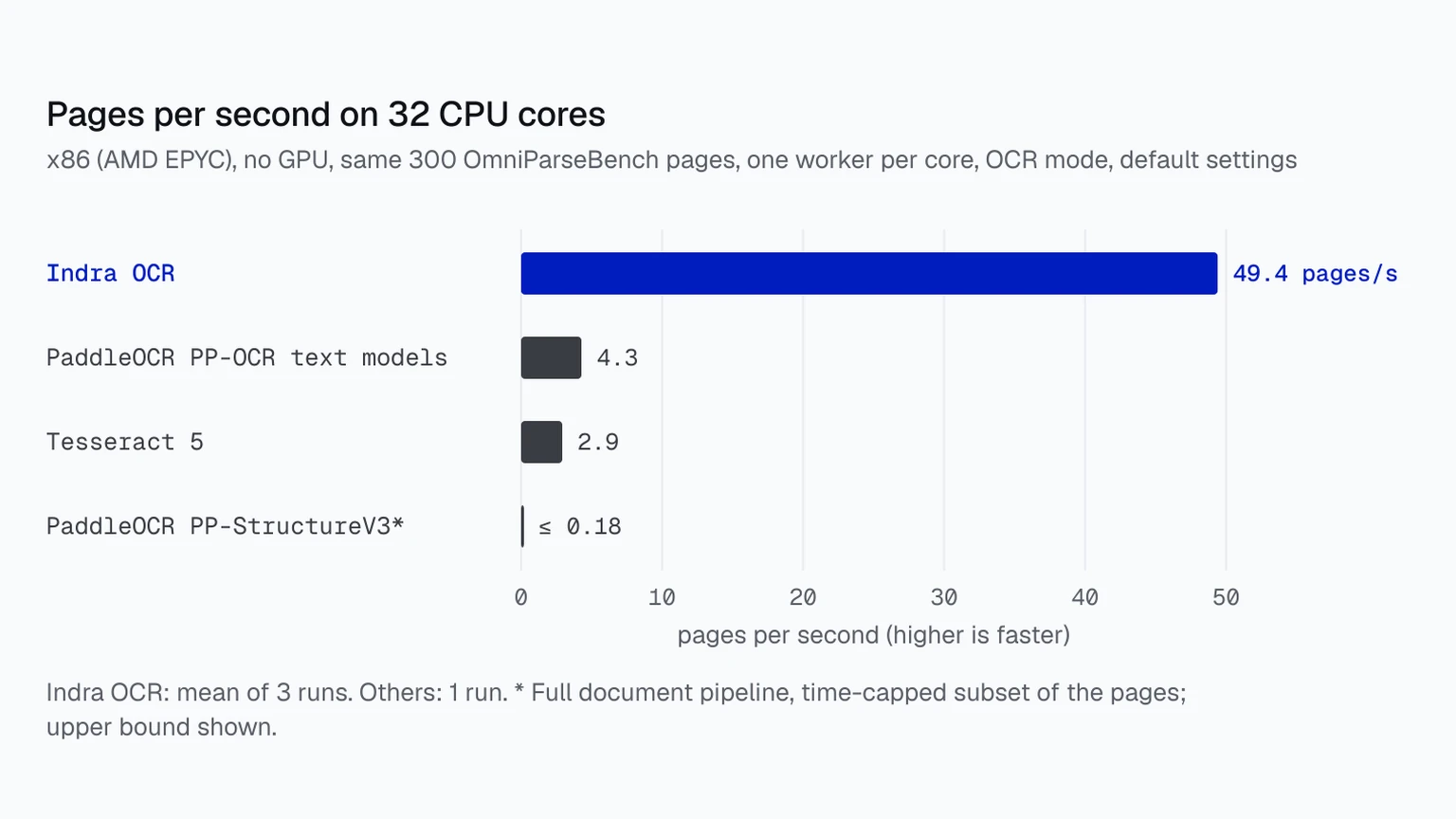
On throughput, Datalab ran each engine with one single-threaded worker per core on 300 pages on an AMD EPYC machine with no GPU. At 32 cores Indra processed 49.4 pages per second, against 4.28 for PP-OCR text models, 2.92 for Tesseract and at most 0.18 for PP-StructureV3. Model loading is excluded; a 300-page job including loading ran at 37.7 pages per second.
How do you use it, and what does the licence allow?
Installation is one command, pip install indra-ocr. Running indra-ocr on a PDF prints markdown, the --out option writes one file per input using all cores, and --format json returns lines, boxes, layout blocks, confidences and timings. A Python call, indra_ocr.load(), returns a converter that yields pages, and indra-ocr-viewer opens a local web page that draws the boxes and reading order over each page. The first run downloads the models from Hugging Face.
The licence has two parts. The code is Apache 2.0. The weights use a modified OpenRAIL-M licence that bars commercial use by organisations with more than $20 million in gross revenue in the prior year or more than $20 million in total funding, except for personal or research use, and by anyone offering a product that competes with Datalab’s. Datalab sells broader commercial licences and points users who need higher accuracy to its hosted Chandra model.
That makes Indra free for hobbyists, researchers and most startups, but larger companies that want to run it in production will need to talk to Datalab first.
Why does a tiny CPU OCR model matter?
Several recent OCR releases have gone the other way, towards larger vision-language models that run on GPUs. LightOn’s LightOnOCR-3 ships 0.8B to 4B models that return markdown and layout boxes, and Tencent’s Youtu-Parsing-Omni is a 5B model that parses pages, charts, audio and video. Those models aim for accuracy on hard documents; Indra aims for volume on cheap hardware.
Datalab’s argument is that for many digital and scanned documents, speed matters more than perfect accuracy. Getting “good enough” text cheaply is enough for jobs such as classifying, splitting or indexing large archives, and many teams can only run those jobs on CPUs because GPUs are expensive.
That kind of bulk extraction often feeds search indexes and retrieval systems for AI assistants, where the first problem is simply getting the text and structure out. Our explainer on OCR versus document AI covers why reading text and understanding a document are different steps. Indra sits firmly on the reading side, with layout and order added.
What are the limitations?
All the numbers above come from Datalab, on a benchmark Datalab built. Datalab ran every engine with default settings and notes that faster settings exist whose accuracy it did not score; PP-StructureV3’s throughput figures are upper bounds from a time-capped subset of pages. Datalab publishes a script to reproduce the Indra rows, but no independent results were available when AI Lookout checked.
Datalab is also open about the trade-offs. Simple tables come out clean, but tables with multi-level headers, merged cells or no ruling lines often lose structure. Indra does not read handwriting yet, passing about 8 per cent of the benchmark’s handwriting tests. It cannot OCR Arabic, Hebrew, Thai, Japanese kana or Korean Hangul from scans, and it does not support vertical text such as traditional Chinese newspapers. Old scanned math remains hard even with math mode on.
The project is also brand new: the repository had just over 50 stars on 14 October, a day after launch. Datalab’s advice is that Indra should do well on mostly clean print in its supported scripts, and that it is the wrong tool for handwritten, badly degraded or table-heavy pages.
Common questions
Does Indra OCR need a GPU?
No. It runs on CPUs using about 18 MB of ONNX models with ONNX Runtime, and Datalab’s speed figures were measured on machines without a GPU. It installs without PyTorch.
Can I use Indra OCR commercially?
The code is Apache 2.0. The weights are free for research, personal use and organisations under $20 million in annual revenue or total funding that do not compete with Datalab; others need a commercial licence from Datalab.
Is Indra OCR more accurate than Tesseract?
On Datalab’s own OmniParseBench test, yes: 41.3 on text against 19.3 for Tesseract 5 in default mode. Those results have not been independently reproduced, and Indra does not yet read handwriting.
Sources & further reading
How this story was made
Written by Kristian Kostov with AI assistance and checked against the linked sources. Company performance claims are attributed to the company. Analysis reflects AiLookout’s interpretation; we have not independently tested the products discussed. The cover is a cropped example output published by the developer in its openly licensed repository, credited in the caption. It is not an AiLookout test or screenshot.
Our editorial standards